Blog

  • Dependency Inversion Principle

    Title: Our Renewal Reminders Went to Expired Customers, and We Couldn’t Test It

    The task sounded simple: email customers 3 days before their subscription expires.

    A few weeks after launch, support forwarded us angry messages. Customers whose subscriptions had already expired were getting “renew soon” emails every single day.

    The bug was one missing condition. What hurt more was the reason we missed it: the code was impossible to unit test.

    What Dependency Inversion really means

    The Dependency Inversion Principle says that high-level business logic should not depend on low-level details like databases, email servers, or the system clock. Both should depend on abstractions, which are usually interfaces.

    Here is the code we shipped:

    public class RenewalReminderService
    {
        public void SendReminders()
        {
            var repository = new SqlSubscriptionRepository();
            var smtp = new SmtpClient("smtp.company.com");
    
            var expiring = repository.GetAll()
                .Where(s => (s.ExpiresOn - DateTime.Now).TotalDays <= 3);
    
            foreach (var subscription in expiring)
            {
                smtp.Send("no-reply@company.com", subscription.Email,
                    "Renew soon", "Your plan expires soon.");
            }
        }
    }

    Look at the condition. If a subscription expired two weeks ago, the difference is negative, and a negative number is always less than or equal to 3. Expired customers were included.

    Why nobody caught it

    To test this method, you would need:

    • A real SQL database with test data
    • A real SMTP server, or you’d email real people
    • A way to control what DateTime.Now returns, which is impossible

    So nobody wrote a test. The high-level rule, “who gets a reminder,” was welded to three low-level details.

    The fix: depend on abstractions

    First we define what the business logic needs, next to the business logic:

    public interface ISubscriptionRepository
    {
        Task<IReadOnlyList<Subscription>> GetActiveAsync(CancellationToken ct);
    }
    
    public interface IEmailSender
    {
        Task SendAsync(string to, string subject, string body, CancellationToken ct);
    }

    For time, .NET 8 and later has TimeProvider built in, so we don’t need to invent our own clock interface. Now the service:

    public class RenewalReminderService
    {
        private readonly ISubscriptionRepository _subscriptions;
        private readonly IEmailSender _email;
        private readonly TimeProvider _time;
    
        public RenewalReminderService(
            ISubscriptionRepository subscriptions,
            IEmailSender email,
            TimeProvider time)
        {
            _subscriptions = subscriptions;
            _email = email;
            _time = time;
        }
    
        public async Task SendRemindersAsync(CancellationToken ct)
        {
            var now = _time.GetUtcNow();
            var subscriptions = await _subscriptions.GetActiveAsync(ct);
    
            foreach (var s in subscriptions)
            {
                var daysLeft = (s.ExpiresOn - now).TotalDays;
    
                if (daysLeft is >= 0 and <= 3)
                    await _email.SendAsync(s.Email, "Renew soon", "Your plan expires soon.", ct);
            }
        }
    }

    Now the rule is clear and readable, and the missing lower bound (>= 0) is obvious.

    The test we couldn’t write before

    [Fact]
    public async Task Does_not_remind_expired_subscribers()
    {
        var time = new FakeTimeProvider(new DateTimeOffset(2026, 10, 13, 0, 0, 0, TimeSpan.Zero));
        var repository = new FakeSubscriptionRepository(
            new Subscription { Email = "a@x.com", ExpiresOn = time.GetUtcNow().AddDays(-1) });
        var email = new FakeEmailSender();
        var service = new RenewalReminderService(repository, email, time);
    
        await service.SendRemindersAsync(CancellationToken.None);
    
        Assert.Empty(email.Sent);
    }

    No database, no mail server, and the clock is under our control. FakeTimeProvider comes from the Microsoft.Extensions.TimeProvider.Testing package.

    Wiring it up

    In production, the real implementations are plugged in at startup:

    builder.Services.AddSingleton(TimeProvider.System);
    builder.Services.AddScoped<ISubscriptionRepository, SqlSubscriptionRepository>();
    builder.Services.AddScoped<IEmailSender, SmtpEmailSender>();
    builder.Services.AddScoped<RenewalReminderService>();

    Where the interfaces live matters

    ISubscriptionRepository and IEmailSender belong with the business logic, not with the SQL or SMTP code. SqlSubscriptionRepository and SmtpEmailSender depend on those interfaces, not the other way around. That is the “inversion”: the details now point toward the business rules.

    Three terms people mix up

    • Dependency Inversion is the principle: depend on abstractions
    • Dependency Injection is the technique: pass dependencies in through the constructor
    • The IoC container is the tool that does the passing for you

    When not to do this

    You don’t need an interface for every class. Invert dependencies at the boundaries: databases, network calls, the file system, the clock, and randomness. A small helper that formats a string doesn’t need one.

    The lesson

    If you can’t write a fast unit test for your most important logic, it’s usually because it creates its own dependencies. Make the business rule depend on interfaces, inject the details from outside, and the code becomes testable and replaceable at the same time.
  • Interface Segregation Principle

    Title: We Needed a Read-Only Repository. The Interface Forced Us to Fake Seven Methods.

    Our reporting queries were slowing down the main database. The fix was clear: send report queries to a read replica.

    So I created ReadReplicaUserRepository. Then I opened the interface it had to implement and my heart sank. IUserRepository had seven methods, and five of them were about writing data.

    A read-only database was being forced to implement Add, Update, Delete, and BulkImport.

    What Interface Segregation really means

    The Interface Segregation Principle says that no class should be forced to depend on methods it doesn’t use. In practice, it means: don’t build one big interface that serves everybody. Build smaller ones shaped around what each client actually needs.

    Here is the interface we had:

    public interface IUserRepository
    {
        User? GetById(int id);
        IReadOnlyList<User> GetAll();
        void Add(User user);
        void Update(User user);
        void Delete(int id);
        void BulkImport(IEnumerable<User> users);
        string ExportToCsv();
    }

    And the report service that used it:

    public class UserReportService
    {
        private readonly IUserRepository _users;
    
        public UserReportService(IUserRepository users) => _users = users;
    
        public int CountActiveUsers()
            => _users.GetAll().Count(u => u.IsActive);
    }

    UserReportService reads one method. But it depends on all seven. That causes real problems:

    • The read replica class has to implement write methods it can’t support, usually by throwing exceptions
    • Hand-written test fakes must implement all seven methods just to test one
    • A change to BulkImport can force recompiling and retesting code that only reads

    The fix: split by who uses it

    public interface IUserReader
    {
        User? GetById(int id);
        IReadOnlyList<User> GetAll();
    }
    
    public interface IUserWriter
    {
        void Add(User user);
        void Update(User user);
        void Delete(int id);
    }
    
    public interface IUserImporter
    {
        void BulkImport(IEnumerable<User> users);
    }

    ExportToCsv didn’t belong in a repository at all, so it moved to a CsvUserExporter class. That was a separate responsibility hiding inside the interface.

    The main database class can still implement everything:

    public class SqlUserRepository : IUserReader, IUserWriter, IUserImporter
    {
        // all methods
    }

    And the read replica now only promises what it can really do:

    public class ReadReplicaUserRepository : IUserReader
    {
        public User? GetById(int id) { /* query the replica */ }
        public IReadOnlyList<User> GetAll() { /* query the replica */ }
    }

    The report service asks only for what it needs:

    public class UserReportService
    {
        private readonly IUserReader _users;
    
        public UserReportService(IUserReader users) => _users = users;
    
        public int CountActiveUsers()
            => _users.GetAll().Count(u => u.IsActive);
    }

    Wiring it up

    This is where the payoff shows. Reports read from the replica, while writes go to the primary:

    builder.Services.AddScoped<SqlUserRepository>();
    builder.Services.AddScoped<IUserWriter>(sp => sp.GetRequiredService<SqlUserRepository>());
    builder.Services.AddScoped<IUserImporter>(sp => sp.GetRequiredService<SqlUserRepository>());
    builder.Services.AddScoped<IUserReader, ReadReplicaUserRepository>();

    The first line registers the SQL class itself, and the next two lines forward the interfaces to that same instance. That way you get one SqlUserRepository per request, not one per interface.

    Testing gets easier too

    public class FakeUserReader : IUserReader
    {
        private readonly List<User> _users;
        public FakeUserReader(params User[] users) => _users = users.ToList();
    
        public User? GetById(int id) => _users.FirstOrDefault(u => u.Id == id);
        public IReadOnlyList<User> GetAll() => _users;
    }

    Two methods instead of seven. The test says exactly what the report service needs, and nothing else.

    When not to overdo it

    Don’t split into one-method interfaces by reflex. Group methods by the client that uses them. Two or three well-chosen role interfaces beat fifteen tiny ones.

    The lesson

    A fat interface couples unrelated clients together and forces implementers to lie. Shape interfaces around what the caller needs, and you also get honest implementations and simpler tests.

  • Liskov Substitution Principle

    Title: Support Clicked “Refund.” The Server Threw an Exception.

    We added gift cards as a payment method. Quick job: create a GiftCardPayment class, inherit from our PaymentMethod base class, done.

    Two weeks later, a support agent clicked Refund on an order paid with a gift card, and the page returned a 500 error.

    The code compiled. The tests passed. It still crashed in production, because the subclass didn’t keep the promises its parent made.

    What Liskov Substitution really means

    The Liskov Substitution Principle says that a subclass must be usable anywhere its base class is used, without the program breaking or behaving strangely.

    Think of inheritance as a promise. The base class tells every caller, “anything of this type can do these things.” If a subclass can’t keep that promise, every caller that trusted it is now in danger.

    Here is what we wrote:

    public abstract class PaymentMethod
    {
        public abstract void Charge(decimal amount);
        public abstract void Refund(decimal amount);
    }
    
    public class CreditCardPayment : PaymentMethod
    {
        public override void Charge(decimal amount) { /* charge the card */ }
        public override void Refund(decimal amount) { /* refund to the card */ }
    }
    
    public class GiftCardPayment : PaymentMethod
    {
        public override void Charge(decimal amount) { /* deduct from balance */ }
    
        public override void Refund(decimal amount)
            => throw new NotSupportedException("Gift cards cannot be refunded.");
    }

    And the code that used it:

    public class RefundService
    {
        public void RefundOrder(Order order)
        {
            order.PaymentMethod.Refund(order.Total); // crashes for gift cards
        }
    }

    RefundService did nothing wrong. It trusted that any PaymentMethod can refund, because the base class said so. The gift card class broke that promise.

    How to spot a Liskov violation

    • An override that throws NotImplementedException or NotSupportedException
    • An override that silently does nothing
    • Callers that check “is” or “as” before using a method, because they don’t trust the type
    • A subclass that rejects inputs the base class accepts

    Fix 1: make the contract something every type can honor

    Ask what the business actually wants. For us, refunding a gift card payment means giving the customer store credit. That is valid behavior, so we can make the contract say so:

    public enum RefundOutcome
    {
        RefundedToOriginalMethod,
        StoreCreditIssued
    }
    
    public abstract class PaymentMethod
    {
        public abstract void Charge(decimal amount);
        public abstract RefundOutcome Refund(decimal amount);
    }
    
    public class GiftCardPayment : PaymentMethod
    {
        public override void Charge(decimal amount) { /* deduct from balance */ }
    
        public override RefundOutcome Refund(decimal amount)
        {
            // add the amount back as store credit
            return RefundOutcome.StoreCreditIssued;
        }
    }

    Now RefundService works for every payment type, and the UI can show a different message depending on the outcome.

    Fix 2: if a type truly can’t do it, don’t give it the method

    Sometimes there is no sensible behavior. Then the operation shouldn’t be on the shared type at all:

    public interface IPaymentMethod
    {
        void Charge(decimal amount);
    }
    
    public interface IRefundablePayment : IPaymentMethod
    {
        void Refund(decimal amount);
    }
    
    public class CreditCardPayment : IRefundablePayment { /* ... */ }
    public class GiftCardPayment : IPaymentMethod { /* Charge only */ }

    A method that needs refunds now asks for an IRefundablePayment. The compiler stops anyone from passing a gift card to it, so the mistake becomes a build error and not a production error.

    The lesson

    “Is-a” in code means “behaves-as,” not “sounds like it in English.” A Square inheriting from Rectangle sounds right, until someone sets width and height separately. Before you inherit, ask one question: can every caller of the base type safely use my subclass without knowing which one they got? If the honest answer is no, the design needs to change, not the caller.

  • Open/Closed Principle

    Title: Adding One Shipping Option Broke International Orders for an Hour

    Marketing wanted a “same-day delivery” option for Black Friday weekend. Easy request. I opened our ShippingCalculator, added one more else-if, and deployed.

    An hour later, support told us international customers were being charged domestic shipping.

    I had put my new branch in the wrong place in the chain. One new feature broke a feature that had been working for two years.

    What Open/Closed really means

    The Open/Closed Principle says software should be open for extension but closed for modification. In plain words: you should be able to add new behavior without editing code that already works.

    Here is the code that caused the problem:

    public class ShippingCalculator
    {
        public decimal Calculate(string method, Order order)
        {
            if (method == "standard")
                return 5m;
            else if (method == "express")
                return 15m;
            else if (method == "international")
                return 25m + order.WeightKg * 4m;
            else
                throw new ArgumentException($"Unknown method: {method}");
        }
    }

    Every new shipping method means opening this class and changing tested logic. Every edit risks breaking the branches you didn’t mean to touch. The class is open for modification and closed for extension, which is exactly backwards.

    The fix: one class per rule

    Step 1: define a contract that every shipping method follows.

    public interface IShippingStrategy
    {
        string Method { get; }
        decimal Calculate(Order order);
    }

    Step 2: move each branch into its own class, unchanged.

    public class StandardShipping : IShippingStrategy
    {
        public string Method => "standard";
        public decimal Calculate(Order order) => 5m;
    }
    
    public class ExpressShipping : IShippingStrategy
    {
        public string Method => "express";
        public decimal Calculate(Order order) => 15m;
    }
    
    public class InternationalShipping : IShippingStrategy
    {
        public string Method => "international";
        public decimal Calculate(Order order) => 25m + order.WeightKg * 4m;
    }

    Step 3: the calculator no longer knows any shipping method by name.

    public class ShippingCalculator
    {
        private readonly IReadOnlyDictionary<string, IShippingStrategy> _strategies;
    
        public ShippingCalculator(IEnumerable<IShippingStrategy> strategies)
        {
            _strategies = strategies.ToDictionary(s => s.Method);
        }
    
        public decimal Calculate(string method, Order order)
        {
            if (!_strategies.TryGetValue(method, out var strategy))
                throw new ArgumentException($"Unknown method: {method}");
    
            return strategy.Calculate(order);
        }
    }

    How the calculator gets its strategies

    You might wonder where that IEnumerable comes from. The DI container supplies it. You register every implementation under the same interface:

    builder.Services.AddScoped<IShippingStrategy, StandardShipping>();
    builder.Services.AddScoped<IShippingStrategy, ExpressShipping>();
    builder.Services.AddScoped<IShippingStrategy, InternationalShipping>();
    builder.Services.AddScoped<ShippingCalculator>();

    When something needs a ShippingCalculator, the container sees the IEnumerable parameter and passes in all three registered strategies.

    Now add same-day delivery

    public class SameDayShipping : IShippingStrategy
    {
        public string Method => "same-day";
        public decimal Calculate(Order order) => 30m;
    }
    
    builder.Services.AddScoped<IShippingStrategy, SameDayShipping>();

    ShippingCalculator did not change. The standard, express, and international code did not change. There is nothing existing that this new feature can break, and the new class gets its own small unit test.

    Bonus: two bugs we got for free

    An unknown method now throws instead of silently falling through. And ToDictionary throws at startup if two strategies share a Method name, so a copy-paste mistake fails immediately and not in production.

    When not to do this

    Don’t create strategies for two branches that never change. Wait until the second or third variation shows up, so you know what the real axis of change is. Abstracting too early gives you classes nobody needed.

    The lesson

    If adding a feature means editing a long if-else or switch, that’s the signal. Put each variation in its own class behind an interface, and let new behavior arrive as new code, not edits to old code.

  • Single Responsibility Principle

    Title: One Class, Four Reasons to Change: How a VAT Update Broke Our Order Emails

    Finance asked for a small change: round the VAT on invoices differently. One line, in one method. I made the change, the tests passed, and I shipped it.

    The next morning, customers were not getting their order confirmation emails.

    The invoice change had nothing to do with email. Except in our code, it did, because both lived inside the same method.

    What Single Responsibility really means

    Most people read the Single Responsibility Principle as “a class should do only one thing.” That’s not quite it.

    The real idea: a class should have only one reason to change. Or put another way, it should answer to only one group of people.

    Here is the code we had:

    public class OrderService
    {
        public void PlaceOrder(Order order)
        {
            // 1. Validation
            if (order.Items.Count == 0)
                throw new InvalidOperationException("Order is empty.");
    
            // 2. Persistence
            using var connection = new SqlConnection("Server=...;Database=Shop;");
            connection.Open();
            // INSERT order and items ...
    
            // 3. Invoice
            var subtotal = order.Items.Sum(i => i.Price * i.Quantity);
            var vat = Math.Round(subtotal * 0.15m, 2);
            var invoicePdf = PdfBuilder.Create(order, subtotal, vat);
    
            // 4. Email
            var message = new MailMessage("no-reply@shop.com", order.CustomerEmail, "Your order", "Thanks!");
            message.Attachments.Add(new Attachment(new MemoryStream(invoicePdf), "invoice.pdf"));
            new SmtpClient("smtp.company.com").Send(message);
        }
    }

    Count the reasons this class has to change:

    • The business team changes validation rules
    • The database team changes the schema
    • Finance changes tax or invoice rules
    • Marketing changes the email provider or template

    Four groups of people, one file. Whenever any of them asks for a change, they edit the same method that also runs everyone else’s logic. Our VAT edit introduced a failure for orders containing a zero-price item. The exception was thrown before the email line, so the email never ran. A tax change broke an email.

    The fix

    We split the class by reason to change. Each part gets its own class, and OrderService only coordinates:

    public class OrderService
    {
        private readonly IOrderValidator _validator;
        private readonly IOrderRepository _repository;
        private readonly IInvoiceGenerator _invoices;
        private readonly IOrderEmailSender _email;
    
        public OrderService(
            IOrderValidator validator,
            IOrderRepository repository,
            IInvoiceGenerator invoices,
            IOrderEmailSender email)
        {
            _validator = validator;
            _repository = repository;
            _invoices = invoices;
            _email = email;
        }
    
        public async Task PlaceOrderAsync(Order order, CancellationToken ct)
        {
            _validator.Validate(order);
            await _repository.SaveAsync(order, ct);
            var invoice = _invoices.Generate(order);
            await _email.SendConfirmationAsync(order, invoice, ct);
        }
    }

    The VAT logic now lives in one small class that finance owns:

    public class InvoiceGenerator : IInvoiceGenerator
    {
        private const decimal VatRate = 0.15m;
    
        public byte[] Generate(Order order)
        {
            var subtotal = order.Items.Sum(i => i.Price * i.Quantity);
            var vat = Math.Round(subtotal * VatRate, 2);
            return PdfBuilder.Create(order, subtotal, vat);
        }
    }

    The wiring is one line per class in Program.cs. ASP.NET Core’s container reads the OrderService constructor and supplies each dependency:

    builder.Services.AddScoped<IOrderValidator, OrderValidator>();
    builder.Services.AddScoped<IOrderRepository, SqlOrderRepository>();
    builder.Services.AddScoped<IInvoiceGenerator, InvoiceGenerator>();
    builder.Services.AddScoped<IOrderEmailSender, SmtpOrderEmailSender>();
    builder.Services.AddScoped<OrderService>();

    What changed in practice

    The next VAT change touches one file. We can unit test InvoiceGenerator with a zero-price order in two lines, which would have caught our bug before it shipped.

    To be fair, SRP doesn’t decide what happens when invoice generation fails. That is still a workflow decision in OrderService. What SRP gives you is that the failure now lives in a small, testable class instead of hiding inside a 200-line method.

    A quick test you can use

    Describe the class in one sentence. If you need the word “and,” it probably has more than one responsibility. “Validates orders and saves them and emails customers” is three classes.

    When not to split

    If a class has two small methods that always change together, leave them together. Splitting everything into one-method classes gives you a codebase nobody can follow. Split when the reasons to change are genuinely different.

  • Our CSV Export Took 9 Seconds. Reflection Was Doing the Same Work 50,000 Times.

    A customer reported that exporting their order history to CSV felt “frozen.” About 50,000 rows, and the request sat there for nearly nine seconds.

    The database query was fast. The network was fine. I spent half a day profiling before the answer showed up in a flame graph, in a place I hadn’t thought to look: reflection.

    What reflection actually is

    Reflection lets your code inspect itself at runtime. You can ask a type what properties it has, read a property’s value by name, or call a method you only know by a string. It’s how serializers, ORMs, dependency injection containers, and mappers work under the hood.

    It’s powerful because your code no longer needs to know the types at compile time. It costs something because the runtime has to look up metadata every time you ask.

    Real-world example: before

    Our exporter was generic. It took any list of objects and a list of column names, and wrote them out. Here’s the simplified version:

    public string Export<T>(IEnumerable<T> rows, string[] columns)
    {
        var sb = new StringBuilder();
    
        foreach (var row in rows)
        {
            foreach (var column in columns)
            {
                var prop = row.GetType().GetProperty(column);
                var value = prop.GetValue(row);
                sb.Append(value).Append(',');
            }
            sb.AppendLine();
        }
    
        return sb.ToString();
    }

    It looks harmless. But with 50,000 rows and 8 columns, GetProperty ran 400,000 times. Every call asked the runtime to search the type’s metadata for a property it had already found on the previous row.

    Real-world example: after

    The property doesn’t change between rows. Only the object does. So the lookup belongs outside the loop:

    public string Export<T>(IEnumerable<T> rows, string[] columns)
    {
        var props = columns
            .Select(c => typeof(T).GetProperty(c))
            .ToArray();
    
        var sb = new StringBuilder();
    
        foreach (var row in rows)
        {
            foreach (var prop in props)
            {
                sb.Append(prop.GetValue(row)).Append(',');
            }
            sb.AppendLine();
        }
    
        return sb.ToString();
    }

    Eight metadata lookups instead of 400,000. The export dropped from about nine seconds to under one.

    If you need to go further

    PropertyInfo.GetValue still has overhead on every call, because it’s a late-bound invocation. For truly hot paths, you can compile the getter once into a delegate and reuse it:

    var param = Expression.Parameter(typeof(T), "x");
    var getter = Expression.Lambda<Func<T, object>>(
        Expression.Convert(Expression.Property(param, "Name"), typeof(object)),
        param).Compile();
    
    var value = getter(row); // close to a normal property read

    Compiling costs something up front, so it only pays off when the same property is read many thousands of times. That is exactly why libraries like AutoMapper and many serializers build and cache these delegates internally. In newer .NET versions, source generators take this further by moving the work to compile time, so there is no runtime reflection at all.

    When reflection is perfectly fine

    Reflection isn’t the villain. Reading metadata once at startup, scanning assemblies to register services, or building a one-off admin tool are all reasonable uses. The problem is reflection inside a hot loop, where a cost you’d never notice once gets multiplied by the size of your data.

    The lesson

    Reflection works the way a phone book works. Looking up one number is trivial. Looking up the same number 400,000 times is a design problem. If the answer won’t change between iterations, find it once, keep it, and reuse it.

  • Generics in C#: Write Reusable, Type-Safe Code

    Have you ever written the same logic multiple times because you needed to support different data types?

    C# Generics help solve this problem by allowing developers to create classes, interfaces, methods, and delegates that work with different types while maintaining compile-time type safety.

    1. What are Generics?

    Generics let you define a type or method using a type parameter, commonly represented by T.

    For example:

    public T GetValue<T>(T value)
    {
        return value;
    }

    You can call this method with different types:

    int number = GetValue(10);
    string name = GetValue("Faiz");

    The same method works with both values without requiring separate implementations.

    2. Why are Generics useful?

    Type safety: The compiler checks that you use compatible types, reducing the need for unsafe casts.

    Code reusability: Instead of duplicating logic for integers, strings, and other types, you can reuse a generic implementation.

    Performance: Generic collections avoid the boxing and unboxing overhead associated with storing value types in non-generic collections such as ArrayList.

    Maintainability: One well-designed generic class can replace several nearly identical classes.

    3. Where will you find Generics in .NET?

    You probably already use generics in your daily work:

    • List<T> — stores a collection of a specific type.
    • Dictionary<TKey, TValue> — stores key-value pairs.
    • Task<T> — represents an asynchronous operation that produces a result.
    • IEnumerable<T> — provides a strongly typed way to enumerate values.

    For example:

    List<int> numbers = [1, 2, 3];
    List<string> names = ["Faiz", "Ahmed"];

    Both collections use the same generic collection type but enforce different element types.

    4. What are Generic Constraints?

    Sometimes, a generic method needs to restrict which types it accepts.

    public class Repository<T> where T : class
    {
        // T must be a reference type.
    }

    The where T : class constraint tells the compiler that T must be a reference type. Other constraints can require an interface, a base class, or a parameterless constructor.

    Final Thoughts

    Generics are essential for building reusable libraries, maintainable services, and type-safe .NET applications.

    Don’t just learn the syntax. Look at the generic types you already use in ASP.NET Core and understand how they help reduce duplication and improve type safety.

    📌 Save this post
    ♻️ Share if it is helpful for you and others
    🛎️ Follow me for more software engineering insights

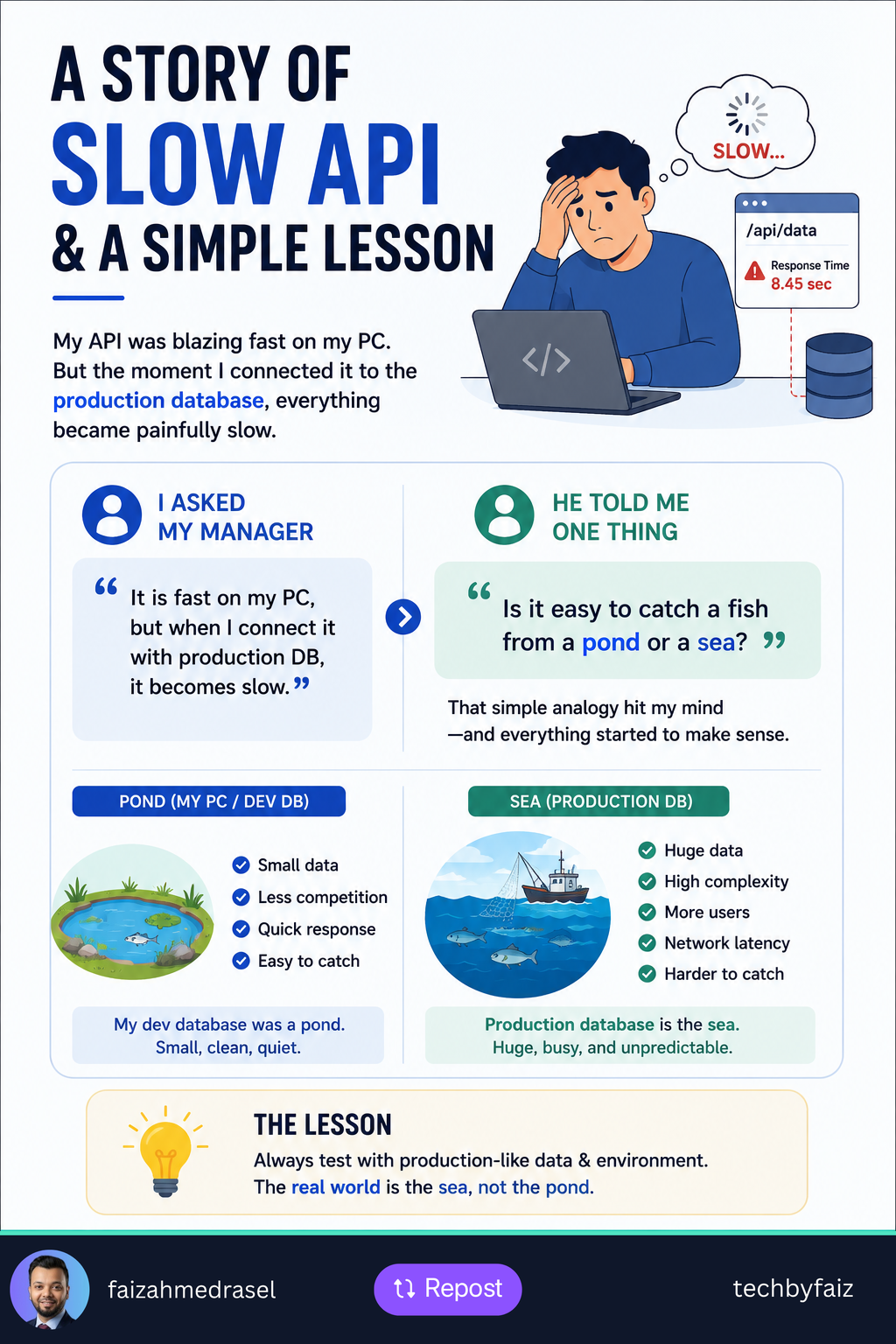
  • My API Was Fast on My PC, but Slow in Production

    My API Was Fast on My PC, but Slow in Production

    I was once really frustrated because an API I was working on was running very fast on my PC.

    Everything looked good.

    The response time was low, the code seemed fine, and there was no obvious performance problem.

    Then I connected the API to the production database.

    Suddenly, it became slow.

    Very slow.

    My first thought was:

    “What is wrong with my API?”

    So I asked my manager.

    I explained that the API was fast with my local database but became slow when connected to the production database.

    His response gave me a simple lesson that I still remember.

    He asked:

    “Is it easy to catch a fish from a pond or from the sea?”

    At first, I thought it was just an analogy.

    But it made perfect sense.

    My local database was the pond

    My development database was relatively small.

    There were fewer records, fewer users, fewer concurrent operations, and a much simpler environment.

    A query could run quickly because there simply wasn’t much data to process.

    It was like catching a fish in a small pond.

    Production was the sea

    The production database was completely different.

    It had significantly more data, real users, more concurrent requests, and a more complex workload.

    A query that took milliseconds locally could behave very differently with millions of records.

    Production also introduces factors such as:

    • Database indexes
    • Execution plans
    • Network latency
    • Concurrent queries
    • Locking and blocking
    • Resource limitations
    • Real-world data distribution

    That’s when I realized something important:

    A query being fast on your machine doesn’t mean it’s production-ready.

    What changed in my thinking?

    Instead of asking only:

    “Does this work?”

    I started asking:

    “How will this behave with real production-scale data?”

    That changes how you test performance.

    You need to test with realistic data volumes, examine query execution plans, monitor database performance, and measure API response times under realistic workloads.

    The lesson

    Your local environment can be a pond.

    Production can be an ocean.

    Something that works perfectly in a pond may behave very differently in the sea.

    So when you’re working on performance-sensitive APIs, don’t test only with small development datasets.

    Test against production-like data and conditions.

    Because the real performance test begins when your API meets the sea.

  • Unit Test vs Integration Test vs End-to-End Test: Which One Should You Write?

    When I first started learning software testing, I thought:

    “Why do we need so many different types of tests?”

    If an End-to-End (E2E) test verifies the whole application, isn’t that enough?

    Over time, I realized that each type of test answers a different question.

    Understanding that changed how I think about testing.


    1. Unit Test

    A unit test verifies a single unit of code, usually a method or class, in isolation.

    Dependencies such as databases, APIs, or file systems are replaced with mocks or fakes.

    Example:

    • Does CalculateDiscount() return the correct value?
    • Does OrderService apply business rules correctly?

    Characteristics

    • Very fast
    • Easy to debug
    • Highly reliable
    • Runs frequently during development

    2. Integration Test

    An integration test verifies that multiple components work correctly together.

    Instead of mocking everything, it tests real interactions.

    Example:

    • Can the API save data to the database?
    • Does Entity Framework Core correctly persist entities?
    • Does the application communicate properly with Redis or RabbitMQ?

    Characteristics

    • Slower than unit tests
    • Tests real infrastructure
    • Catches configuration and integration issues

    3. End-to-End (E2E) Test

    An End-to-End test validates the entire application from the user’s perspective.

    Example:

    1. User logs in.
    2. Creates an order.
    3. Makes a payment.
    4. Receives a confirmation.

    Everything—from the UI to the database—is tested together.

    Characteristics

    • Slowest type of test
    • Closest to real user behavior
    • Excellent for validating critical business workflows

    Quick Comparison

    FeatureUnit TestIntegration TestEnd-to-End Test
    ScopeSingle method/classMultiple componentsEntire application
    DependenciesMockedRealReal
    SpeedFastMediumSlow
    PurposeVerify business logicVerify component interactionVerify complete user journey

    Which One Should You Write?

    The answer isn’t one or the other.

    A healthy test suite usually contains all three.

    • Write Unit Tests for business logic.
    • Write Integration Tests for APIs, databases, and external services.
    • Write End-to-End Tests for critical user journeys.

    Each type catches different kinds of problems.


    Final Thoughts

    One lesson I’ve learned is this:

    The goal of testing isn’t to increase the number of tests. It’s to increase confidence in your software.

    The best strategy is to balance speed, reliability, and coverage by choosing the right test for the right scenario.

  • ASP.NET Core Filters: Stop Repeating the Same Code in Every Controller

    ASP.NET Core Filters: Stop Repeating the Same Code in Every Controller

    When I first started building ASP.NET Core APIs, I noticed a pattern.

    Many controller actions contained the same code:

    • Validate requests.
    • Check permissions.
    • Log execution time.
    • Handle exceptions.
    • Write audit logs.

    The APIs worked.

    But every new endpoint meant copying the same logic again.

    That’s when I discovered Filters.

    I realized they weren’t just another ASP.NET Core feature—they were a way to keep controllers focused on business logic while moving cross-cutting concerns to reusable components.

    What Are Filters?

    Filters allow you to execute code before or after an action method runs.

    Instead of repeating common logic in every controller, you write it once and apply it wherever it’s needed.


    Types of Filters

    Authorization Filter

    Runs first and determines whether the request is authorized.

    Example:

    • Check user permissions.
    • Validate custom authorization rules.

    Resource Filter

    Executes before model binding.

    Useful for:

    • Caching
    • Short-circuiting requests
    • Resource initialization

    Action Filter

    Runs before and after the controller action.

    Common use cases:

    • Input validation
    • Logging
    • Measuring execution time
    • Auditing

    Exception Filter

    Handles exceptions thrown by controller actions.

    Useful for:

    • Logging exceptions
    • Returning consistent error responses

    Result Filter

    Runs before and after the action result is executed.

    Useful for:

    • Modifying response headers
    • Wrapping API responses
    • Adding metadata

    When Should You Use Filters?

    Filters are ideal for logic that applies across multiple endpoints.

    Examples include:

    • Audit logging
    • Request validation
    • Performance monitoring
    • Response formatting
    • Custom authorization

    If you find yourself copying the same code into multiple controllers, it’s often a sign that a filter could help.


    When Should You Avoid Filters?

    Filters aren’t the answer for every problem.

    Choose the right tool for the job:

    • Middleware for application-wide concerns such as authentication, CORS, or request logging.
    • Filters for MVC or API action-specific behavior.
    • Services for business logic.

    Keeping these responsibilities separate leads to a cleaner architecture.


    Final Thoughts

    One lesson changed the way I structure APIs:

    Controllers should coordinate requests—not perform every supporting task themselves.

    Filters help eliminate duplication, improve maintainability, and keep your business logic where it belongs.