Category: Uncategorized

  • Payment করার পর User-এর কাছে একাধিক Notification চলে গেল! আসল সমস্যা কোথায়?

    Payment করার পর User-এর কাছে একাধিক Notification চলে গেল! আসল সমস্যা কোথায়?

    ধরুন, আপনি একটি Payment System নিয়ে কাজ করছেন।

    একজন User সফলভাবে Payment করলেন।

    সবকিছু ঠিকঠাক।

    কিন্তু কয়েক মিনিট পর Customer Support থেকে ফোন এল—

    “একই Payment-এর জন্য Customer-এর কাছে ৫টা SMS আর ৫টা Email গেছে!”

    প্রথমে মনে হতে পারে,

    “Notification Service-এ নিশ্চয়ই Bug আছে।”

    কিন্তু একজন অভিজ্ঞ Software Engineer জানেন, সমস্যাটা শুধু Notification Service-এ নাও হতে পারে।


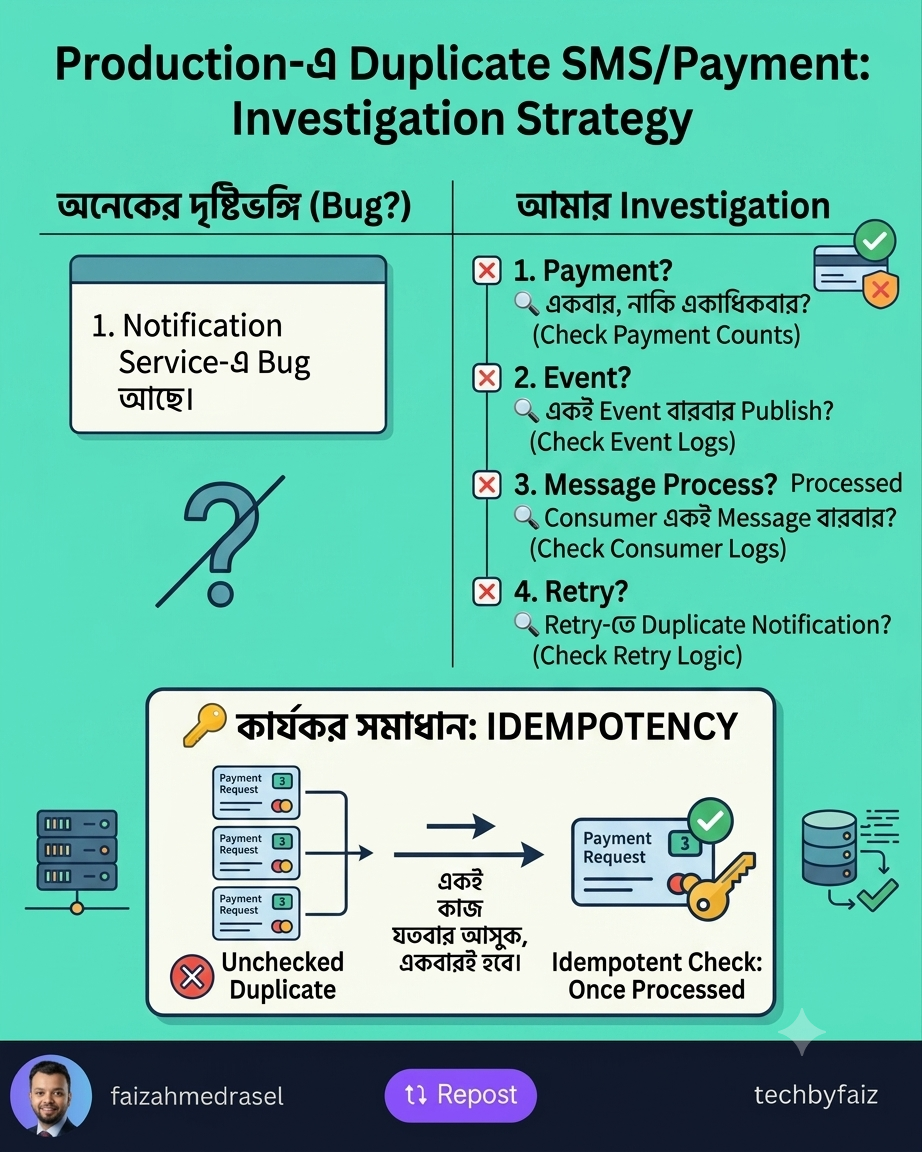
    প্রথমে Investigation করব

    আমি নিজেকে কয়েকটি প্রশ্ন করব—

    • Payment কি একবার হয়েছে, নাকি একাধিকবার?
    • Notification Service কি একাধিক request পেয়েছে?
    • Message Queue-তে কি একই message একাধিকবার publish হয়েছে?
    • Retry mechanism কি duplicate event তৈরি করেছে?
    • Consumer কি একই message বারবার process করেছে?

    প্রথমে Root Cause খুঁজে বের করতে হবে।


    সম্ভাব্য কারণগুলো

    ১. Duplicate API Request

    User বারবার Pay বাটনে ক্লিক করেছেন।

    অথবা Network timeout হওয়ায় Mobile App আবার একই request পাঠিয়েছে।

    সমাধান:

    Idempotency Key ব্যবহার করুন।

    একই Payment Request একাধিকবার এলেও শুধুমাত্র একটি Payment Process হবে।


    ২. Message Queue Retry

    RabbitMQ, Azure Service Bus বা Kafka অনেক সময় failed message আবার পাঠায়।

    যদি Consumer Idempotent না হয়,

    তাহলে একই Notification বারবার চলে যেতে পারে।


    ৩. Database-এ Duplicate Event

    একই Payment-এর জন্য একাধিক Event Insert হয়েছে।

    Notification Service সব Event-ই Process করেছে।


    ৪. Consumer Crash

    Consumer Notification পাঠানোর পর Crash করেছে।

    কিন্তু Message Acknowledge করার আগেই Restart হয়েছে।

    ফলে একই Message আবার Process হয়েছে।


    তাহলে সমাধান কী?

    ✅ Idempotency

    প্রতিটি Payment Event-এর একটি Unique Id রাখুন।

    যদি একই Event আবার আসে,

    সেটি Ignore করুন।


    ✅ Deduplication

    Notification পাঠানোর আগে Database-এ Check করুন—

    এই PaymentId-এর জন্য Notification ইতোমধ্যে পাঠানো হয়েছে কি না।


    ✅ Message Acknowledgement

    Notification সফলভাবে পাঠানোর পরই Message Acknowledge করুন।


    ✅ Logging & Monitoring

    প্রতিটি ধাপ Log করুন—

    • Payment Received
    • Event Published
    • Notification Sent
    • Retry Count

    এতে Root Cause খুঁজে পাওয়া অনেক সহজ হয়।


    আমার শেখা একটি বিষয়

    Distributed System-এ একটি গুরুত্বপূর্ণ নীতি হলো—

    “Network is unreliable.”

    তাই একই Request বা Event একাধিকবার আসতেই পারে।

    ভালো System সেইটিই, যা Duplicate Request পেলেও একই কাজ বারবার করে না।

    শেষ কথা

    একজন Senior Engineer-এর কাজ শুধু Bug Fix করা নয়।

    এমনভাবে System Design করা, যাতে একই সমস্যা ভবিষ্যতে আর না ঘটে।

    Payment System-এর মতো Critical Application-এ Idempotency, Deduplication এবং Proper Monitoring কোনো Luxury নয়—এগুলো Requirement।

  • Boxing vs Unboxing in C#: Understanding the Hidden Performance Cost

    Boxing vs Unboxing in C#: Understanding the Hidden Performance Cost

    As C# developers, we often work with both value types (such as int, bool, and double) and reference types.

    Most of the time, .NET handles the conversion between them automatically. However, these conversions come with a cost that every developer should understand.

    This is where boxing and unboxing come into play.

    What Is Boxing?

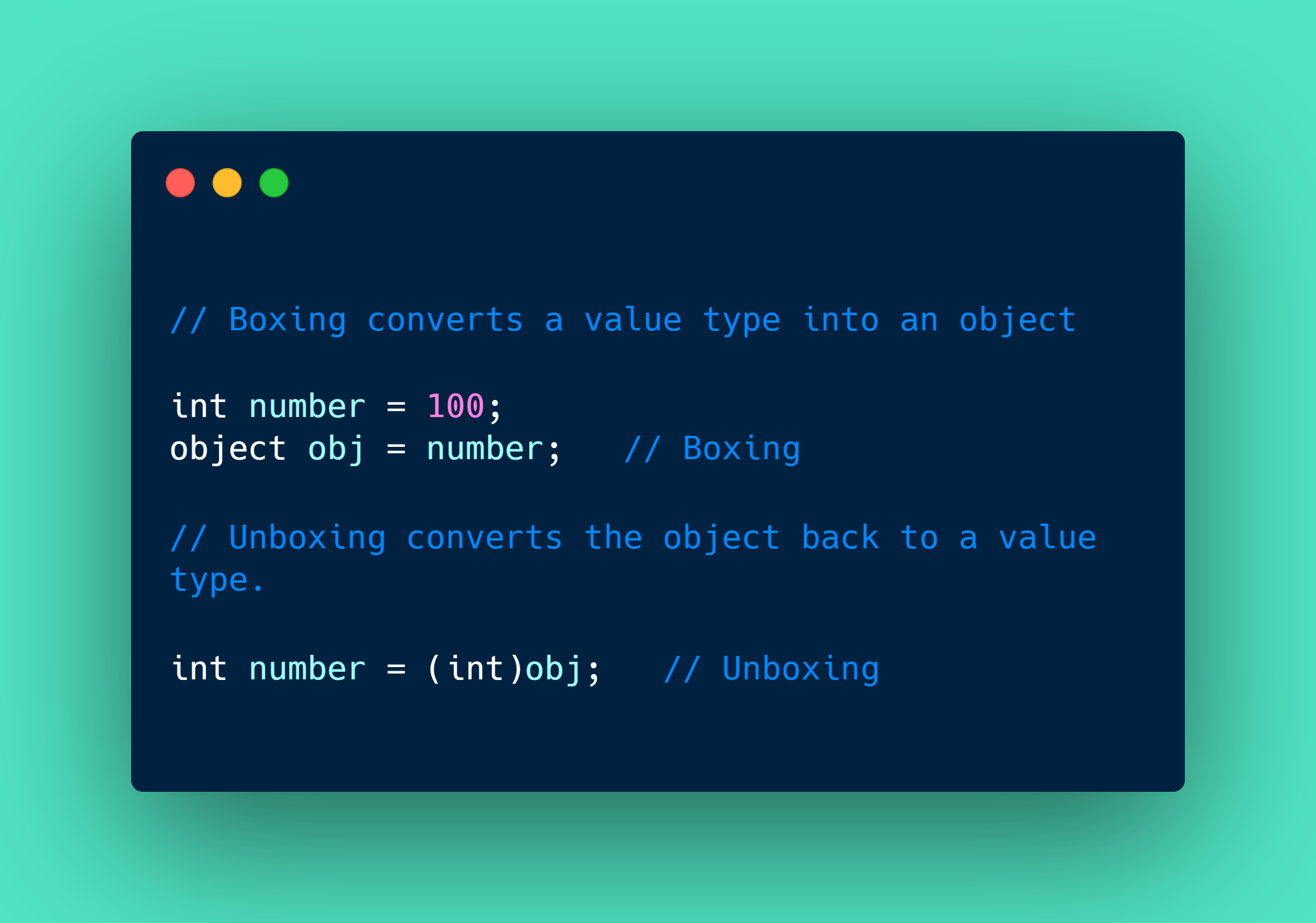
    Boxing is the process of converting a value type into a reference type (object or an interface it implements).

    When boxing occurs, the CLR creates a new object on the managed heap and copies the value into it.

    Example:

    int number = 100;
    
    object obj = number;   // Boxing
    

    Here, number is copied from the stack into a new object on the heap.


    What Is Unboxing?

    Unboxing is the reverse process.

    It extracts the value type from the boxed object.

    Example:

    object obj = 100;
    
    int number = (int)obj;   // Unboxing
    

    Notice that unboxing requires an explicit cast.

    If the boxed object isn’t the expected type, an InvalidCastException will be thrown.

    Example:

    object obj = 100;
    
    double value = (double)obj;   // Throws InvalidCastException
    

    Why Does Boxing Matter?

    Boxing may look harmless, but it has hidden costs:

    • Allocates memory on the heap
    • Copies the value
    • Increases garbage collection pressure
    • Reduces performance when performed repeatedly

    Consider this loop:

    ArrayList list = new ArrayList();
    
    for (int i = 0; i < 100000; i++)
    {
        list.Add(i);   // Boxing on every iteration
    }
    

    Every integer is boxed before being stored.

    Using a generic collection avoids this overhead:

    List<int> numbers = new List<int>();
    
    for (int i = 0; i < 100000; i++)
    {
        numbers.Add(i);
    }
    

    No boxing occurs because List<int> stores integers directly.


    Common Scenarios That Cause Boxing

    • Assigning a value type to object
    • Using non-generic collections like ArrayList
    • Passing value types where an object parameter is expected
    • Some interface conversions

    How to Avoid Boxing

    ✔ Prefer generic collections (List<T>, Dictionary<TKey, TValue>)

    ✔ Use generic methods instead of methods accepting object

    ✔ Avoid unnecessary casts

    ✔ Profile performance before optimizing


    Interview Tip

    A common interview question is:

    Why are generic collections faster than ArrayList?

    The answer:

    Generic collections store value types directly, avoiding boxing and unboxing operations. This results in fewer heap allocations, less garbage collection, and better performance.


    Final Thoughts

    Boxing and unboxing are fundamental concepts in C#. Although modern .NET has become highly optimized, unnecessary boxing can still impact performance in high-frequency code paths.

    Understanding when boxing occurs helps you write cleaner, faster, and more efficient applications.

  • .NET Framework vs .NET Core: Understanding the Key Differences

    .NET Framework vs .NET Core: Understanding the Key Differences

    Many developers still get confused about the difference between .NET Framework and .NET Core.

    Both are part of the .NET ecosystem, but they were designed for different needs.

    Understanding the difference helps you choose the right technology for your project.


    .NET Framework

    The original .NET platform introduced by Microsoft.

    Commonly used for:

    ✅ Windows desktop applications

    ✅ ASP.NET Web Forms and MVC applications

    ✅ Enterprise applications built for Windows environments

    Characteristics:

    • Windows-only
    • Large ecosystem and mature libraries
    • Supports legacy enterprise applications
    • Limited cross-platform capability

    Example:

    public class CustomerService
    {
        public void Process()
        {
            // Business logic
        }
    }
    

    .NET Core

    A modern, open-source, cross-platform framework designed for today’s applications.

    Commonly used for:

    ✅ Web APIs

    ✅ Cloud-native applications

    ✅ Microservices

    ✅ Container-based solutions

    Characteristics:

    • Cross-platform (Windows, Linux, macOS)
    • Better performance
    • Lightweight and modular
    • Designed for modern application development

    Example:

    app.MapGet("/customers", () =>
    {
        return customers;
    });
    

    Key Differences

    .NET Framework:

    ❌ Windows only

    ❌ Mostly used for existing enterprise systems

    ❌ Larger installation footprint

    .NET Core:

    ✅ Cross-platform

    ✅ Better performance

    ✅ Cloud and container friendly

    ✅ Supports modern development approaches


    What should you choose today?

    For new applications:

    ➡️ Prefer modern .NET (previously called .NET Core)

    For existing enterprise applications:

    ➡️ Continue maintaining .NET Framework or plan a migration strategy based on business needs.


    💡 The important lesson:

    Technology decisions should not only consider what is popular.

    They should consider:

    • Project requirements
    • Deployment environment
    • Long-term maintainability
    • Team expertise

    Knowing the difference between .NET Framework and modern .NET helps developers make better architectural decisions.

    👇 Which one have you worked with more?

    .NET Framework or modern .NET?

    ♻️ If you found this helpful, feel free to repost and share it with your network.

    👉 Follow Faiz Ahmed Rasel for more .NET tips, tutorials, and deep dives.

    #DotNet #DotNetCore #CSharp #SoftwareEngineering #BackendEngineering


  • Control Makes People Behave. Autonomy Makes People Engage.

    Control Makes People Behave. Autonomy Makes People Engage.

    A team can follow rules and still lack ownership.

    Why?

    Because compliance and commitment are not the same thing.

    Control can create short-term results:

    ✅ People follow instructions

    ✅ Tasks are completed on time

    ✅ Processes are maintained

    But excessive control can also create:

    ❌ Fear of making decisions

    ❌ Less creativity

    ❌ Waiting for approval instead of taking ownership

    ❌ A “just do what I was told” mindset

    Autonomy creates a different environment.

    When people have trust and freedom to make decisions:

    ✅ They think beyond their assigned tasks

    ✅ They take responsibility for outcomes

    ✅ They bring new ideas

    ✅ They feel connected to the team’s success

    For example:

    A manager says:

    “Complete this task exactly as I described.”

    The employee focuses on finishing the task.

    A better approach:

    “Here is the goal. Choose the best way to achieve it.”

    The employee starts thinking like an owner.

    Good leadership is not about controlling every action.

    It is about providing:

    • Clear expectations
    • The right direction
    • Necessary support
    • Freedom to execute

    The goal is not to create people who only follow instructions.

    The goal is to build people who can think, decide, and contribute.

    💡 Great teams are not built on control alone.

    They are built on trust with accountability.

    👇 What creates better teams in your experience?

    More control or more autonomy?

    ♻️ If you found this helpful, feel free to repost and share it with your network.

    👉 Follow Faiz Ahmed Rasel for more .NET tips, tutorials, and deep dives.

    #Leadership #TeamManagement #ProfessionalGrowth #SoftwareEngineering #CareerDevelopment

  • EF Core Pagination: The Right Way to Handle Large Data Sets

    EF Core Pagination: The Right Way to Handle Large Data Sets

    EF Core Pagination: The Right Way to Handle Large Data Sets

    Returning thousands of records from an API might work during development.

    But what happens when your table has millions of rows?

    This is where pagination becomes essential.


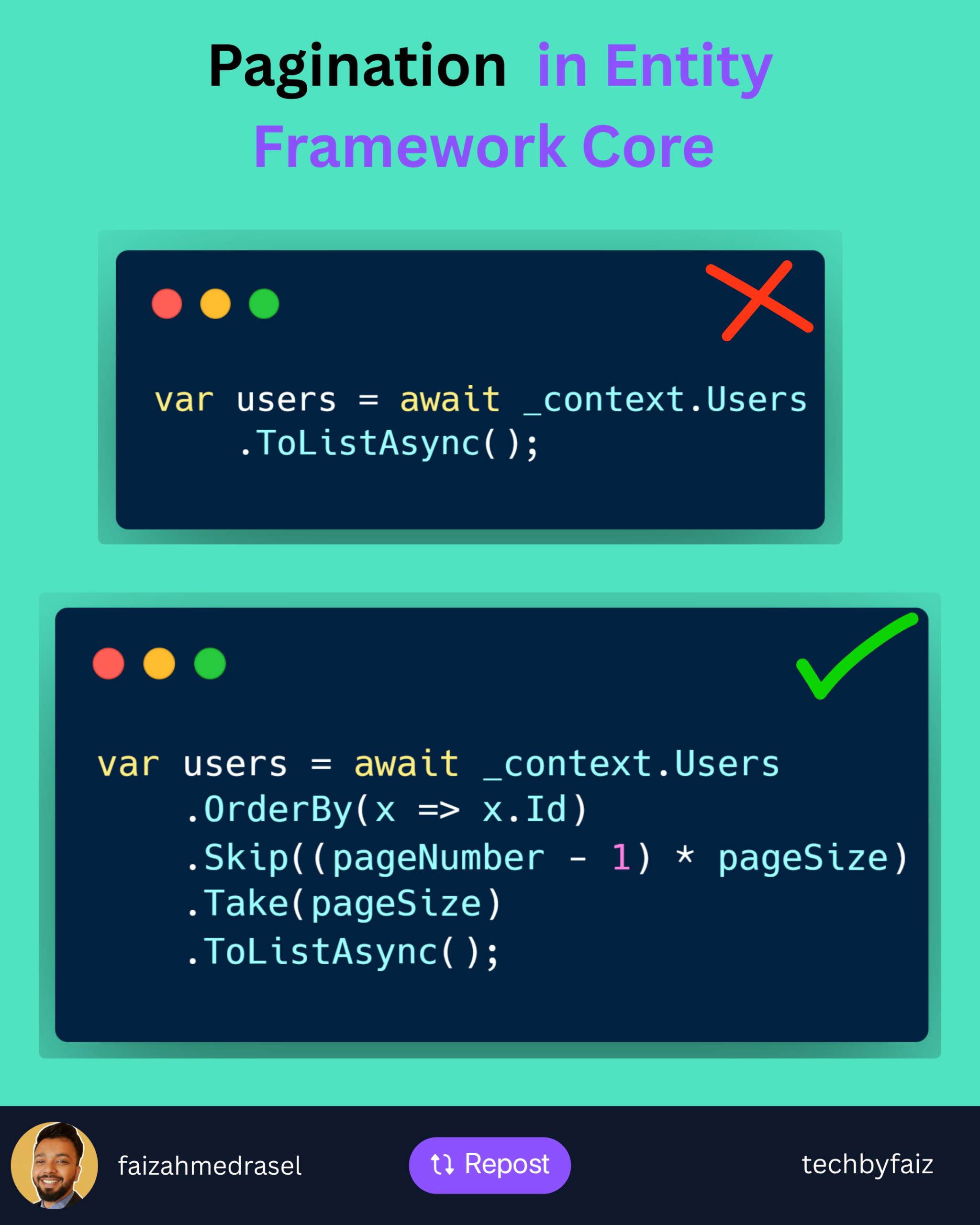
    A common mistake:

    var users = await _context.Users
        .ToListAsync();
    

    It loads everything into memory.

    Problems:

    ❌ Higher memory usage

    ❌ Slower response time

    ❌ Increased database load

    ❌ Poor user experience


    Better Approach: Pagination with EF Core

    var users = await _context.Users
        .OrderBy(x => x.Id)
        .Skip((pageNumber - 1) * pageSize)
        .Take(pageSize)
        .ToListAsync();
    

    How it works:

    Skip()
    ➡️ Ignores previous pages

    Take()
    ➡️ Returns only the required number of records

    Example:

    PageNumber = 3
    PageSize = 20
    

    EF Core skips:

    (3 - 1) × 20 = 40 records
    

    Then returns:

    Next 20 records
    

    Important Pagination Practices

    ✅ Always use OrderBy()

    Without ordering, database results are not guaranteed.

    ✅ Use projection when possible

    Instead of:

    .ToListAsync()
    

    Prefer:

    .Select(x => new UserDto
    {
        Id = x.Id,
        Name = x.Name
    })
    .ToListAsync();
    

    Only fetch the data you need.

    ✅ Return pagination metadata

    Example:

    {
      "pageNumber": 1,
      "pageSize": 20,
      "totalRecords": 500
    }
    

    For Large Tables

    Skip() and Take() work well for most scenarios.

    But for millions of records, consider:

    Keyset Pagination (Seek Pagination)

    It avoids the performance cost of skipping large numbers of rows.


    💡 Rule of thumb:

    Pagination is not just a UI feature.

    It is a database performance strategy.

    A scalable API should control how much data it retrieves and sends.


    👇 What pagination approach do you prefer in your APIs?

    Offset pagination (Skip/Take) or Keyset pagination?

    ♻️ If you found this helpful, feel free to repost and share it with your network.

    👉 Follow Faiz Ahmed Rasel for more .NET tips, tutorials, and deep dives.

    #DotNet #EntityFrameworkCore #CSharp #WebAPI #BackendEngineering

  • 𝙒𝙧𝙞𝙩𝙞𝙣𝙜 𝙈𝙖𝙞𝙣𝙩𝙖𝙞𝙣𝙖𝙗𝙡𝙚 𝘾𝙤𝙙𝙚

    𝙒𝙧𝙞𝙩𝙞𝙣𝙜 𝙈𝙖𝙞𝙣𝙩𝙖𝙞𝙣𝙖𝙗𝙡𝙚 𝘾𝙤𝙙𝙚

    You are not the last person to touch your code
    Someone else will read it.

    Maybe in a rush.
    Maybe under pressure.
    Write for humans first,
    machines second.

    ✅ Maintainable code checklist

    Clear naming
    Small, focused methods
    No hidden side-effects
    Proper documentation for complex logic

    💡 Truth
    Code readability saves time,
    reduces bugs, and scales teams.